 小王的博客
小王的博客














【前端】高颜值登录页面(一键复制)
1160 字
6 分钟
【前端】高颜值登录页面(一键复制)
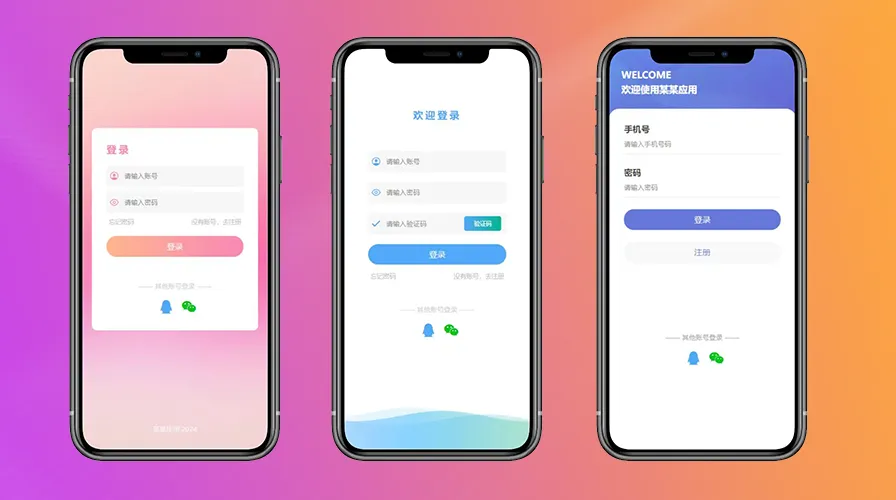
登录页面是每一个项目不可缺少的页面,是一个应用的门面,首次进入看见的可能就是登录界面,做了这么久的前端,发现登录界面其实都大同小异,有时候没必要从头写,我写了几个自认为比较好看的uniapp登录界面记录一下,下次用到的话,可以直接复制过来,修改下就行了。只有静态页面,并未做逻辑上的东西,这样便于在此基础上做调整。
先看效果:

实际应用效果
源码
粉色登录界面(图一):
<template> <view class="content"> <view class="loginBox"> <h3>登录</h3> <view class="inputBox"> <view class="ipt"> <uni-icons type="contact" size="24" color="rgb(247,120,172)"></uni-icons> <input type="text" value="" placeholder="请输入账号"/> </view> <view class="ipt"> <uni-icons type="eye" size="24" color="rgb(247,120,172)"></uni-icons> <input type="passsword" value="" placeholder="请输入密码"/> </view> <view class="forgetPwd"> <span>忘记密码</span> <span>没有账号,去注册</span> </view> <button>登录</button> </view> <view class="tipbox"> <view class="txt"> —— 其他账号登录 —— </view> <view class="otherUser"> <uni-icons type="qq" size="40" color="rgb(66,157,250)"></uni-icons> <uni-icons type="weixin" size="40" color="rgb(2,187,17)"></uni-icons> </view> </view> </view>
<view class="tip"> 某某应用 2024 </view> </view></template>
<script> export default { data() { return {
} }, onLoad() {
}, methods: {
} }</script>
<style scoped> .content{ height: 100vh; background: url("https://gimg2.baidu.com/image_search/src=http%3A%2F%2Fc-ssl.duitang.com%2Fuploads%2Fitem%2F202005%2F10%2F20200510005139_JR8fL.jpeg&refer=http%3A%2F%2Fc-ssl.duitang.com&app=2002&size=f9999,10000&q=a80&n=0&g=0n&fmt=auto?sec=1714820289&t=e835cde99a094cbd98f9c318f25160ec") no-repeat; background-size: 100% 100%; } .loginBox{ position: absolute; top: 50%; left: 50%; transform: translate(-50%,-60%); width: 90%; background-color: #fff; border-radius: 20rpx; padding: 60rpx; box-sizing: border-box; } h3{ color: rgb(247,120,172); font-size: 40rpx; letter-spacing: 10rpx; margin-bottom: 40rpx; } .inputBox{
} .ipt{ height: 86rpx; display: flex; justify-content: flex-start; align-items: center; margin-bottom: 20rpx; background-color: #f5f5f5; border-radius: 10rpx; padding-left: 10rpx; } .ipt input{ margin-left: 20rpx; font-size: 28rpx; } .ipt input{ margin-left: 20rpx; } .forgetPwd{ font-size: 26rpx; color: #b5b5b5; text-align: end; padding:0 10rpx; display: flex; justify-content: space-between; } button{ margin-top: 20rpx; line-height: 85rpx; text-align: center; background: linear-gradient(to right,rgb(255, 170, 127),rgb(247,120,172)); border-radius: 40rpx; color: #fff; margin-top: 40rpx; }
.tip{ text-align: center; font-size: 28rpx; position: fixed; bottom: 50rpx; left: 50%; transform: translate(-50%,-50%); color: #f4f4f4; } .tipbox { text-align: center; margin-top: 100rpx; }
.otherUser { margin-top: 30rpx; display: flex; justify-content: center; }
.txt { font-size: 28rpx; color: #cbcbcb; }
.otherUser .uni-icons { margin-left: 20rpx; }</style>白色登录界面(图二):
<template> <view class="content"> <svg version="1.1" xmlns="http://www.w3.org/2000/svg" xmlns:xlink="http://www.w3.org/1999/xlink" x="0px" y="0px" width="100%" height="100%" viewBox="0 0 1600 900" preserveAspectRatio="xMidYMax slice"> <defs> <linearGradient id="bg"> <stop offset="0%" style="stop-color:rgba(130, 158, 249, 0.06)"></stop> <stop offset="50%" style="stop-color:rgba(76, 190, 255, 0.6)"></stop> <stop offset="100%" style="stop-color:rgba(115, 209, 72, 0.2)"></stop> </linearGradient> <path id="wave" fill="url(#bg)" d="M-363.852,502.589c0,0,236.988-41.997,505.475,0 s371.981,38.998,575.971,0s293.985-39.278,505.474,5.859s493.475,48.368,716.963-4.995v560.106H-363.852V502.589z" /> </defs> <g> <use xlink:href='#wave' opacity=".3"> <animateTransform attributeName="transform" attributeType="XML" type="translate" dur="10s" calcMode="spline" values="270 230; -334 180; 270 230" keyTimes="0; .5; 1" keySplines="0.42, 0, 0.58, 1.0;0.42, 0, 0.58, 1.0" repeatCount="indefinite" /> </use> <use xlink:href='#wave' opacity=".6"> <animateTransform attributeName="transform" attributeType="XML" type="translate" dur="8s" calcMode="spline" values="-270 230;243 220;-270 230" keyTimes="0; .6; 1" keySplines="0.42, 0, 0.58, 1.0;0.42, 0, 0.58, 1.0" repeatCount="indefinite" /> </use> <use xlink:href='#wave' opacty=".9"> <animateTransform attributeName="transform" attributeType="XML" type="translate" dur="6s" calcMode="spline" values="0 230;-140 200;0 230" keyTimes="0; .4; 1" keySplines="0.42, 0, 0.58, 1.0;0.42, 0, 0.58, 1.0" repeatCount="indefinite" /> </use> </g> </svg>
<view class="loginBox"> <h3 style="text-align: center;margin-bottom:120rpx;">欢迎登录</h3> <view class="inputBox"> <view class="ipt"> <uni-icons type="contact" size="24" color="rgb(66,157,250)"></uni-icons> <input type="text" value="" placeholder="请输入账号"/> </view> <view class="ipt"> <uni-icons type="eye" size="24" color="rgb(66,157,250)"></uni-icons> <input type="passsword" value="" placeholder="请输入密码"/> </view> <view class="ipt"> <uni-icons type="checkmarkempty" size="24" color="rgb(66,157,250)"></uni-icons> <input type="text" value="" placeholder="请输入验证码"/> <view class="yzm"> 验证码 </view> </view> <button>登录</button> <view class="forgetPwd"> <span>忘记密码</span> <span>没有账号,去注册</span> </view> </view> <view class="tipbox"> <view class="txt"> —— 其他账号登录 —— </view> <view class="otherUser"> <uni-icons type="qq" size="40" color="rgb(66,157,250)"></uni-icons> <uni-icons type="weixin" size="40" color="rgb(2,187,17)"></uni-icons> </view> </view> </view> </view></template>
<script> export default { data() { return {
} }, methods: {
} }</script>
<style scoped> svg { position: absolute; bottom: 0; left: 0; width: 100%; height:40%; box-sizing: border-box; display: block; background-color: #ffffff; }
.loginBox{ position: absolute; top: 50%; left: 50%; transform: translate(-50%,-60%); width: 90%; border-radius: 20rpx; padding: 60rpx; box-sizing: border-box; } h3{ color:rgb(66,157,250); font-size: 40rpx; letter-spacing: 10rpx; margin-bottom: 40rpx; } .inputBox{
} .ipt{ height: 86rpx; display: flex; justify-content: flex-start; align-items: center; margin-bottom: 40rpx; background-color: #f5f5f5; border-radius: 10rpx; padding-left: 10rpx; } .ipt input{ margin-left: 20rpx; font-size: 28rpx; } .ipt input{ margin-left: 20rpx; } .forgetPwd{ margin-top: 30rpx; font-size: 26rpx; color: #b5b5b5; text-align: end; padding:0 10rpx; display: flex; justify-content: space-between; } button{ margin-top: 20rpx; line-height: 85rpx; text-align: center; background: rgb(66,157,250); border-radius: 40rpx; color: #fff; margin-top: 40rpx; }
.tip{ text-align: center; font-size: 28rpx; position: fixed; bottom: 50rpx; left: 50%; transform: translate(-50%,-50%); color: #f4f4f4; } .tipbox { text-align: center; margin-top: 100rpx; }
.otherUser { margin-top: 30rpx; display: flex; justify-content: center; }
.txt { font-size: 28rpx; color: #cbcbcb; }
.otherUser .uni-icons { margin-left: 20rpx; } .yzm{ text-align: end; font-size: 24rpx; background: linear-gradient(to right,rgb(66,157,250),rgb(0, 170, 127)); height: 60rpx; width: 150rpx; line-height: 60rpx; text-align: center; border-radius: 10rpx; color: #fff; }</style>蓝色登录界面(图三):
<template> <view class="content"> <view class="topBox"> <h3>WELCOME</h3> <h3>欢迎使用某某应用</h3> </view> <view class="inputBox"> <view class="ipt"> <h4>手机号</h4> <input type="text" value="" placeholder="请输入手机号码" /> </view> <view class="ipt"> <h4>密码</h4> <input type="text" value="" placeholder="请输入密码" /> </view> <button class="loginBtn">登录</button> <button class="registerBtn">注册</button>
<view class="tipbox"> <view class="txt"> —— 其他账号登录 —— </view> <view class="otherUser"> <uni-icons type="qq" size="40" color="rgb(66,157,250)"></uni-icons> <uni-icons type="weixin" size="40" color="rgb(2,187,17)"></uni-icons> </view> </view> </view> </view></template>
<script> export default { data() { return {
} }, methods: {
} }</script>
<style scoped> .content { height: 100vh; background-color: aquamarine; background: url("https://www.galaxyclub.cn/Upload/IMAGES/15/0615/38af439784544e95b7c64cad64a14157_650x650.jpg") no-repeat; background-size: cover; }
.topBox { font-size: 34rpx; color: #fff; padding: 80rpx 50rpx; }
h3 { margin-bottom: 10rpx; }
.inputBox { position: fixed; bottom: 0; left: 0; width: 750rpx; height: 85vh; background-color: #fff; border-top-left-radius: 40rpx; border-top-right-radius: 40rpx; padding: 60rpx; box-sizing: border-box; }
.ipt { margin-bottom: 50rpx; }
.ipt h4 { margin-bottom: 20rpx; font-size: 36rpx; color: #333; }
.ipt input { border-bottom: 1px solid #dedede; padding-bottom: 20rpx; font-size: 28rpx; }
.loginBtn { margin-top: 20rpx; line-height: 85rpx; text-align: center; background: linear-gradient(to right, rgb(86, 104, 214), rgb(86, 104, 214)); border-radius: 40rpx; color: #fff; margin-top: 50rpx; }
.registerBtn { margin-top: 20rpx; line-height: 85rpx; text-align: center; border-radius: 40rpx; color: rgb(86, 104, 214); margin-top: 50rpx; border: none; }
.tipbox { position: fixed; bottom: 120rpx; left: 50%; transform: translate(-50%, -120px); }
.otherUser { margin-top: 30rpx; display: flex; justify-content: center; }
.txt { font-size: 28rpx; color: #969696; }
.otherUser .uni-icons { margin-left: 20rpx; }</style>支持与分享
如果这篇文章对你有帮助,欢迎分享给更多人或打赏支持!
相关文章智能推荐
1
PC端登录页源码(一键复制)
前端登录页面是每一个项目不可缺少的页面,是一个应用的门面,首次进入看见的可能就是登录界面,做了这么久的前端,发现登录界面其实都大同小异,有时候没必要从头写,我写了几个自认为比较好看的uniapp登录界面记录一下,下次用到的话,可以直接复制过来,修改下就行了.只有静态页面,并未做逻辑上的东西,这样便于在此基础上做调整。
2
【uniapp】个人中心页面
前端本文档详细介绍了如何使用 UniApp 开发一个个人中心页面。个人中心页面是移动应用中常见的功能模块,通常包含用户的头像、昵称、简介以及各种功能列表。本文将通过三个不同风格的设计示例,展示如何实现这些功能。
3
分享一个非常好用的loading效果网站
前端本文介绍了一个非常实用的加载效果网站,适合前端开发者寻找和使用各种加载动画。以下是文章的详细内容
4
【uniapp】小程序滚动tab
前端本文档详细介绍了如何使用 UniApp 实现一个滚动的 Tab 栏。滚动 Tab 栏在小程序中非常常见,适用于需要展示多个选项卡且每个选项卡内容较多的情况。本文将通过两个不同的实现方式(文字版和图片版)来展示如何实现这一功能。
5
Linux 磁盘空间检查与新硬盘挂载完整指南
Linux本文详细介绍了在 Linux(银河麒麟 V10)环境下挂载新硬盘前的磁盘空间检查方法,以及完整的硬盘分区、格式化、挂载、开机自动挂载配置流程,同时解决了普通用户无 root 权限操作挂载目录的常见问题。
随机文章随机推荐
评论区

文章
209
分类
15
标签
161
总字数
478,322
运行时长
0 天
最后活动
0 天前
站点域名blog.huhaha.vip
Fireflyv6.16.7
Astrov7.2.10
Nodev22.23.2
pnpmv11.22.0
构建时间2026年9月8日 09:40:17
系统信息Linux / x86_64